2023-08-17

Weird outbound AWS traffic discovery


Summary:

It has come to my attention that AWS sometimes generates weird, unexplained traffic - when we first noticed it, it appeared to be mostly rDNS queries, but further investigation has shown it's far more than that. In fact - rDNS isn't even the typical traffic seen. We're seeing this from accounts/instances that have no resources which should be capable of generating said traffic, and it's frequently (but not always) 40 bytes of source traffic.

TL;DR: AWS generating weird 40-byte packets with no discernible cause/source/reason
EDIT: This appears to be due to a quirk in how AWS logs things. Jump to the end for more details.


Disclaimers:

This is a joint discovery with Alex Heacock, and he's basically done all the work on this, including coming up with the first and second versions of the "steps to reproduce", first and second version of the YAML file, and working with AWS Support to see if we can figure out what's going on. I have written and tested this final version of the "steps to reproduce" in my own personal AWS account and confirmed the behavior observed.

Disclaimer: I am a nobody. (Alex is smart though.) It could be we're missing something obvious, but the fact that it can be reproduced so easily and has no obvious explanation, seems somewhat concerning. Speculation has ranges from worst-case (AWS rootkit?) to the more benign (Athena logs pulling in traffic from other VPC resources on the same hardware?).

Prerequisites:

  • AWS account
  • Payment setup in AWS account
  • Willingness to spend ~$32/month as long as you leave the stack up

Steps to reproduce:

  1. Login to AWS and go to CloudFormation
  2. Click "Create Stack"
  3. Set radio button: "Template is ready"
  4. Set radio button: "Upload a template file"
  5. Browse to "vpc_flow_log_test2.yml" (provided below)
  6. Click "Next"
  7. Stack name: "weird-aws-traffic-test" (or your preference)
  8. Click "Next"
  9. Check the box "I acknowledge that AWS CloudFormation might create IAM resources."
  10. Click "Submit"
  11. Refresh a few times to watch progress
  12. Go to Resources tab; confirm all show CREATE_COMPLETE with green/white checkmark/circle
  13. Open Athena
  14. Set radio button: "Query your data"
  15. Click "Launch query editor"
  16. If you don't have an s3 bucket with Athena setup already, follow steps 17-21. Otherwise, you might be able to continue at step 22.
  17. On the banner "Before you run your first query, you need to set up a query result location in Amazon S3." Click "Edit settings"
  18. Click "Browse S3"
  19. Click the radio button for the name that matches step 7 (like: weird-aws-traffic-test-vpcblahblah)
  20. Click "Choose"
  21. Click "Save"
  22. Click "Editor" tab again
  23. Paste query (provided below)
  24. Click "Run"
  25. If you don't see any traffic, wait an hour or two and try again.
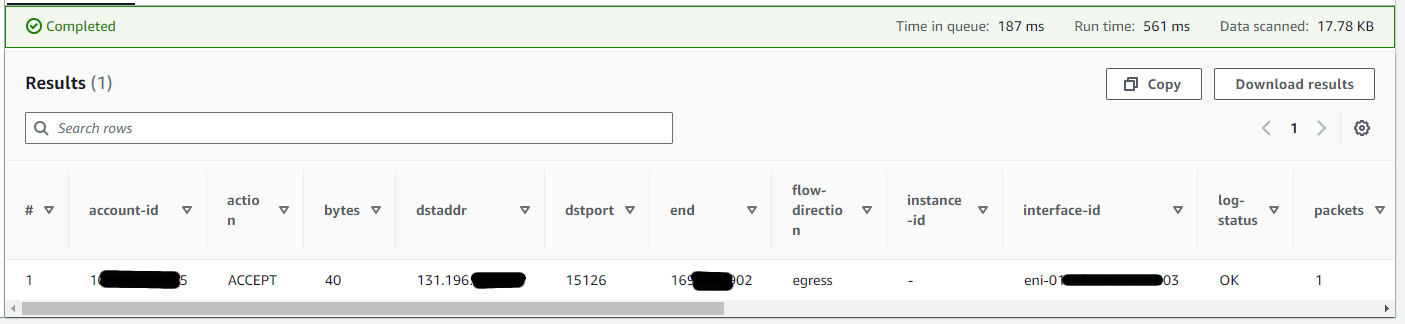
  26. Repeat steps 24-25 until you see something. Odd traffic is "egress" though there's no resources spun up that should be generating. Appears to be DNS, possibly rDNS, considering it's port 53
  27. Done! It's like watching fish in an aquarium.

Steps to cleanup:

  1. Login to AWS and go to CloudFormation
  2. Click the radio button next to the stack you created
  3. Click "Delete"
  4. Click "Delete" again.
  5. Wait a few minutes; refresh the page to confirm deleted.
  6. Done!

Conclusion:

I don't have a conclusion at this point. Hopefully someone can provide some explanation for why this happens.

EDIT: After some time back-and-forth with AWS Support regarding this, we were told these are RST packets. AWS VPC flow logs do not contain TCP flag data when using Version 2 - the version in use that prompted us to notice this. Apparently, another quirk of this version, is that if an unexpected SYN-ACK packet is received, and the VPC responds with an RST packet (as it should, per RFC 793), then the AWS logs the RST packet it sent, but not the SYN-ACK packet that triggered it. Thus, the VPC appears to be sending packets to the source of the SYN-ACK packets entirely unprompted (even though it's not.)


Resources:

YAML file:
Pastebin link: here

Athena query:
SELECT * FROM "vpc_flow_logs_db"."vpc_flow_logs_table"
WHERE srcaddr LIKE '10.0.0.%'
AND action='ACCEPT'
ORDER BY day DESC
limit 10000;

2017-05-10

Programming Extron HTML for reading projector statuses

Note: I intended to publish this a while back. It's now mostly obsolete, but can explain a little more about the SSI stuff mentioned here.

In what amounts to a sort of follow-up to my projector control pages, I have recently been working on some code to do the following:

  1. Show statuses in a pretty, end-user-friendly format.

That's it!

Okay... while the above *is* true, the actual process is a bit more involved:
  1. Grab the status from the Extron box via Server-Side Includes
  2. Have a script on a server somewhere that runs every few seconds, and dumps the statuses from all the Extron boxes in the building, into one big file.
  3. Have another script go through and analyze this file, pull out the relevant information, and spit out JavaScript code based on what it finds
  4. Have webpages that, via polling, update every few seconds to grab the latest version of this JavaScript and display it to the end user

I'm sure much of this could be done more efficiently, but I'm at the stage where I just want to get it "working", and then I can focus on optimizations, better code, and maybe put everything into one massive script that talks directly with the client web browser via AJAX calls and such.

Time for a little more detail...
On pages 4-19 to 4-24 of this manual, there's talk about these Server Side Includes, or SSI, code that can do magical things. The biggest downside is that once you upload an HTML file with SSI code, you can't re-download it (or right-click, view source) to reverse-engineer how it works - because it (the Extron box) actually changes the HTML code of the webpage. This is a feature, not a bug - it's part of how the SSI functionality works.

All of my code is on Github, as usual - and it's very much still a work-in progress. Reading through the relevant parts of the manual (as referenced above), it seems that one's missing something - a feeling of "that's it?", but no... that's it! It's quite magical to upload a webpage that is only a few lines long, but outputs very useful status information. I discovered that, if you don't care about formatting, you can just name the file something ending in ".html", and Extron will happily treat it as valid SSI, provided you use their syntax properly.

2016-08-06

Projector statuses page

I just recently got v0.1.0 of our new projector statuses page working... mostly. Here's the rundown:
  • Extron boxes use this thing called "SSI", or "Server Side Includes", to generate the data I need. It's actually rather well-documented, despite it only being a couple pages worth of information. See the manual, starting about halfway down page 4-19.
  • A Bash/wget script takes all of that data, and dumps it into one big file.
  • A Perl script goes through and parses the data, and spits out JavaScript.
  • Client-side browser code constantly runs/reloads the JavaScript.

Now, you might be wondering why I didn't use "real" AJAX, or push from the server, or do it this way or that way. The answer is simple: I'm not that smart yet. I'd love to, and I welcome suggestions. I just wanted to make it work for now, and I'll figure out how to improve it later.


At a glance, this gives us the following information:
  • What projector it is
  • Whether that projector is on, off, or something else ("cooling down", "error", etc.)
  • How many hours are on each lamp. (Most professional-grade projectors have some sort of monitoring of "lamp hours", as a lifespan/life-remaining indicator.)
  • A colorful dot that summarized the status (green = on, red = off, other colors = other things).
It's still buggy right now. I need to tweak some code, as the page doesn't always display the statuses properly. But it's a step in the right direction, and I'm excited for what's next.
Edit: Most of the bugs have been sorted, and I think it's as good as it's going to get. (2016-10-15)

As is typical for me, the code is all on Github. See the notes file if you want a more in-depth look at how everything fits together.

2015-01-28

Projector control pages

Long time between posts! I've been meaning to compose this particular entry for a while, but have been swamped with other projects. Now that I've got most stuff under control, I figured I'd put in the effort to do a proper write-up.

Back in 2012 I started working at Lutheran Church of Hope in West Des Moines, Iowa. I was a general-purpose base-level technician; now, I have the utmost privilege of working on many aspects of some of our various mission-critical systems.

One task that was placed in front of me, was to see if there was a way to control projectors from a web browser. I knew there was a way, it was just a matter of "what will it take". At the time, we were using wired remotes as the primary method of controlling them. (Being pro-grade projectors, they were wired/wireless "hybrid" remotes. They had IR LEDs, as well as a TRS port. The TRS port talked serial to the projector, while the IR LEDs would work as standard IR-based remotes do. We had them wired, as many projectors were in locations that would make IR communication impractical at best.)

Eventually, we purchased some devices from Extron, that each came to be known colloquially as an "Extron box". They're little rackmountable things that can talk RS-232 and TCP/IP.

At this point, a little bit of background on Extron might be useful. Extron makes (among other things) these Extron boxes that are designed for control and automation of pretty much anything that can talk serial. They're often used in colleges for control of all sorts of A/V systems, including projectors, screens, TVs, digital signage, DVD players, et cetera. They're designed to be used with an ActiveX webpage, little panels with buttons, and a handful of other control devices. The ActiveX webpage can be slightly customized, and can be used for controlling, as well as viewing the status of, anything the Extron boxes can talk to via a driver. Extron has a plethora of drivers available. If the one you need doesn't exist, just tell them, and they'll make one for you. Makes sense as to why they're so popular with colleges.

Anyhow, back at work. We (the Production department) are very much Mac-based, so anything ActiveX was out of the question as a primary means of communication. This is where I come in.

After scouring the Extron documentation, as well as the documentation for the projectors I was attempting to control, I came across a solution: bypass the driver. That's right - instead of trying to spoof ActiveX requests, as I thought I might need to do, I could use the Extron boxes as a dumb TCP/RS-232 bridge of sorts. After figuring out the syntax, it was a simple matter of adding the serial command at the right spot at the end of a GET request.

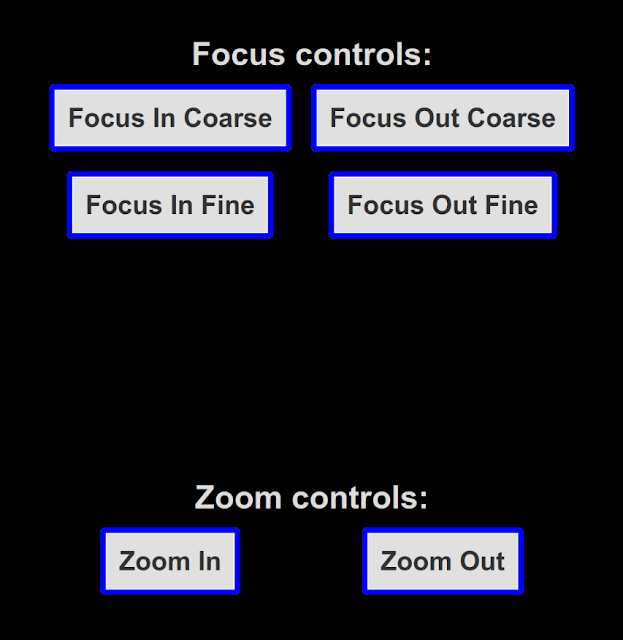
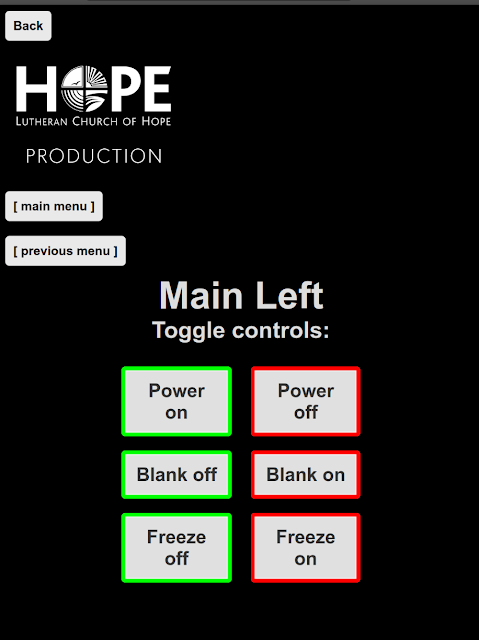
Eventually, while functional, we wanted something more. Now, we have full-blown projector control pages that look good, work well, and have yet to fail us. They use JavaScript to issue the GET requests, so the user never leaves the webpage they're on. (It uses a function that uses the XMLHttpRequest() function.)

Below I've included a few screenshots; not all of these are on Extron boxes, but they all use JavaScript and CSS to accomplish their task. The ones that aren't on Extron boxes are no fun to work with; that's a story for another time, if it becomes a requested talking point.


All our current code is on Github; I just recently went through and started refactoring all our existing JavaScript to utilize a more scalable method. Previously, we had been setting every button to an anchor tag with an href of the form http://SOME_IP_ADDRESS/remote-control.html?cmd=W01RS|SERIAL_COMMAND_DATA, whereas now, they all use the form extronBox (roomInBuilding, whichProjector, projectorBrand, actionToPerform). The magic all happens in this file; feel free to have a look. I plan to maintain this as a rather generic file to be used for any given Extron box/connected device pairing; comments/suggestions are welcome.

Edit 2025-06-15:
Blogger broke the screenshots at some point, so I am generating new ones based on how the GitHub repository appeared on the original date of this post being published. Due to changes in browsers since then, they may not be 100% historically accurate.

Screenshots:


Some specifics, for those curious:

  • the Extron syntax is http://ip-address/filename/cmd=W[port]RS|[data] for RS-232.
    • Many of our extron boxes have several ports; W01RS would specify "RS-232 port 1", W02RS would specify "RS-232 port 2", etc.
    • the "data" is pretty much verbatim. You can, however, encode binary data by using URL encoding. For example, "%0D" is a carriage return.
  • All the parameters passed to the extronBox() function can either be variable names, or a string (if the string is enclosed in quotes).
  • The function needs to be able to handle variable names as input, so the variables intended for use all have a default value; the default value is basically the string you type when you type the variable. (Examples: bridge == 'bridge'projector_on == 'projector-on'.)
  • Flow of the extronBox() function is as follows:
    • First, populate the variables with more meaningful content than is default. Based on what room we pass to the function, the populateVars() function determines what to set the other variables to. For example, let's say the Bridge's center projector is connected to port 3. populateVars() could set projector_center to '03'
    • After that, determine the device-specific commands. Example: Sanyo projectors have an "off" command of "C01". Using a switch-case block, the command variable is set to 'C01' if the action to perform is power_off.
      • Since Sanyo projectors all like a carriage return after every command, there's a little bit of code right after the switch-case block to add '%0D' to every command string, before it gets sent to the Extron box.
    • Finally, the full string (the URL) is assembled, and the httpGet() function is used to make an AJAX request to the Extron box, executing the requested command.

This work has greatly simplified building projector control pages for me; I hope others might find it useful someday.


2014-12-14

Data, data everywhere!

A few days (weeks?) ago, I went to backup my Windows drive. Simple enough, right? Unless you're an idiot like me, and somehow borked something to the point that the Clonezilla storage drive you're using won't save it anymore, even thought it has plenty of free space.

Time to transfer the contents of that drive to the 2TB RAID1 array. Oh wait... never got around to fixing the server. It's still running as two gimped partitions, neither of which have enough space, though the 2TB isn't nearly full.

Time to fix that... except it contains the only "known good" copy of the data. After using "rsync" to backup to an external drive, as is my backup procedure (terrible, I know), it was time to get to work.

Except I forgot how I setup my server. I knew it wasn't pretty, but I didn't document it. I figured it was set-and-forget. How right I was. I haven't had any issues with it (thanks, Debian!), but I also forgot how to use it.

Fortunately, I'm a Debian-family Linux dude, so it didn't take me too long (with Google's help, of course) to figure out. I used "mdadm" and "lvm" on my Xen host, and did everything else (mounting and serving) from a Xen guest.

Then, I had issues transferring everything back. Several days later, all was back to normal.

I still need to back up my Windows drive.

2011-03-31

Intriguing Interactive Google Doodle for Robert Bunsen

I don't often make a big deal out of the Google Doodles, but I found the Doodle currently in use to be especially intriguing for a few different reasons. Though Google has used interactive Doodles in the past, this one is (to my knowledge) more subtly sophisticated than the rest. At first glance, it may simply appear to be animated. However, a closer look shows otherwise.

Moving the mouse back and forth across the screen, I noticed that the flame changes color gradually. (I'm using a maximized Google Chrome window on my Ubuntu installation, but I suspect that it will work the same with any modern browser.) I am guessing that this somehow corresponds to the different colors of flame produced when different chemicals are burned, but I don't know for sure - chemistry is definitely one of my weaker areas of physical science.

Also, moving the mouse up and down heightens or shortens the flame correspondingly; due to the increase or decrease of heat that this would produce in a real-life setup of a system like the one depicted, the overall activity of the system shown in the Doodle increases with the larger flame, and decreases with the smaller flame. For me, it was initially the blue liquid moving from place to place through the coiled structure that caught my attention, and helped me realize this was actually a more interactive Doodle, rather than a sophisticated-but-static animation, as I remember the one for Rube Goldberg as being (though now I question that recollection).

That's all for now; awesome stuff, keep it up, Google!

2010-08-20

How to: Download templates from Avery (without providing your information)

Today I was looking for a template to use with some business card paper from Avery. Upon trying to download the template, I realized that it wouldn't let me without me giving it a valid email address. I really didn't want to, but I did anyways. Now, I'm writing this so that others that might happen to read it won't have to worry about giving Avery their personal information.

First, you need to figure out what template you want. Once you have done that, get to the part where it asks for your name and email address. Then, copy the text that's in the address bar of that window. (On Chrome, this wasn't an issue, but when I tried it in Firefox, the form requesting my information opened in a separate window, which made this part necessary.)

Here's where things start to get fun (and maybe somewhat tricky). Paste the text you copied from the address bar of the form's window into a new tab or window, but don't press [Enter] or go to the URI (yet); it needs to be modified to bypass the name and email form.

Look at the URI, and it should start out similar to this:
"http://www.avery.com/avery/secure/us_softwaredownload?locale=en_us&downloadId="

Depending on where you are trying this from, the part that says:
"us_softwaredownload?locale=en_us"
might be different. Regardless, this is the part between the first ampersand and the last forward-slash before it; this is also the part that needs to be modified.

Change it to:
"downloadprogress?tyurl="
and press the [Enter] key, click "Go"/an arrow, or whatever else you use to go to the URI. You should get the download page for the template you wanted; it should say "Downloading..." (or something similar), and provide a link to click if the download doesn't start automatically.

If you do try this, I'd appreciate a comment letting me know whether or not it worked for you. Thanks!

2010-08-13

Scan, Convert, Share using Android and ZXing


So, I had been looking for an easy way to scan a barcode and then share it as a QR Code (even if the original was in a different format). After a while going through several different applications with no luck, I finally realized what I could do.

The ZXing barcode scanner has a "custom search" feature that allows entering a custom URL for searching. I didn't think that I had any use for it, until I realized that I could use it to easily convert data read from a barcode into QR Code format.

Basically, all I did was utilize the same thing that's used by ZXing's online QR Code generator.
Here's how:
  1. Open the Barcode Scanner application.
  2. Tap the phone's Menu Key.
  3. Tap the "Settings" option.
  4. Tap the "Custom search URL" item (you might need to scroll down first).
  5. Fill in the box with: "http://chart.apis.google.com/chart?cht=qr&chs=300x300&chl=%s" (not including the quotes).
  6. Go back and scan something.
  7. Press the "Custom Search" option.
  8. See below.
Notes:
  • The "300x300" part is the size; I found this to be a good size on my Droid Incredible, but you can change it as needed. (It should remain a square, though.)
  • It doesn't like the "%" (percent) symbol. I haven't found an easy way around this, but I'm sure it could be put into the generator box directly using JavaScript; I just haven't taken the time to figure it out. (Let me know if you do, so I can link to it!)
  • If you scan something that contains a percent symbol, and it's not working properly, replace the "%" in the URL it directs you to with "%25"; then it should work.
Feel free to comment with tips/tricks/improvements, a better way of doing it, or just to let me know you read this post.

2010-08-04

No more social networking for me

At least, not for the most part. After much thought and consideration, I've finally decided to abandon my social networking sites. That said, I might check back every once in a while, (possibly once a month,) but I definitely won't be participating as much as I used to.

Several factors influenced this decision, and I'd like to highlight a few:

  • Security. As most people with an interest in security know, social networking can be a very bad thing. I have not had any issues of my own as a result of social networking, but I'd rather stop before that changes (just in case).
  • Stability. Facebook, now the most popular social networking site, is by far the least usable of the three I'm familiar with (MySpace, Facebook, and myYearbook). Their AJAX code sucks. Their "applications" are a joke. If they can't fix simple bugs, I don't trust them to make sure my "privacy" is secured. Note that I put that word in quotes; I honestly don't believe it exists anymore. To a certain extent, yes, it does; to the extent of having a "privacy policy", absolutely not. That's why I've never posted anything on there that I didn't expect the whole world to see, anyways. Even the "messages" feature hasn't seen anything from me that would be severely detrimental if it were exposed. Either way, I'd rather not support a site that can't even maintain itself, let alone rely on a site like that.
  • Productivity. I plan on learning programming and attending DMACC; eliminating social networking will eliminate one of my biggest distractions.
  • Usefulness (or lack thereof). It's quite ironic that I would join a social networking site in the first place, considering that I'm not really a social person.
  • Communication. If someone needs to communicate with me, they have plenty of other ways to do it; I have Internet access and telephone service (with support for SMS). I'm sure that if someone needs to find a way to communicate with me, they can.
I'm not sure when exactly this will happen, but probably by the end of August, if not much earlier. It wouldn't be unlikely if the end of this week holds the last of my participation. If anyone has any questions, feel free to ask.

2010-02-07

A Day Online

Note: I actually created this a while back, I just never actually posted it. (I did send it via email to some friends/family, though.) Now, although somewhat outdated, I finally got around to posting it here.


So, there I was, standing in the isle, trying to make up my mind on what I should buy to protect my new, $1800 Quad-Core computer, which runs Microsoft Windows Vista Ultimate. I wanted to be safe from all the threats there are on the Internet. So, after a while, one of the guys that works at that Best Buy store came over to me, and asked if I needed any help finding anything.

Well, two and a half hours and $440 later, I ended up with a ID Vault, McAfee Total Protection 2009, Webroot AntiVirus with AntiSpyware & Firewall, Windows Live OneCare 2.0, Trend Micro AntiVirus plus AntiSpyware 2008, Norton 360 Version 2.0 Premier Edition, and Kaspersky Anti-Virus 2009.


After installing them, I decided to do a full system scan with each of them. There was no malware found in any of the scans. So, happy that I was able to figure things out for myself, I went online to download a copy of Photoshop, since I love to edit digital photos, and I've always been told that it is the best program for doing just that.

So, just like my training has taught me, I went to Google, and searched for places I could download Photoshop. I was looking at a few differents sites, one of which was Adobe, and the prices were too high, so I tried searching for download sites that had Photoshop for free. I got lots of results, and even I found one where I could download the product key for free, too!

Surprising, after my download started, I got a pop-up box from Norton AntiVirus telling me that my computer was infected. What the heck! Photoshop!? Who would have thought? Also, the Best Buy guy was wrong – it didn't pop-up in the lower-right of my screen as a little yellow box, it popped-up full-screen as a red and blue flashing window. It must have really been bad, too, because there were twelve exclamation marks after the part that told me I had an infection.

Anyhow, I proceeded to immediately stop the download and scan my computer again by clicking the button to run a full system scan that was in the middle of the pop-up box. It walked me through the process of downloading a program called Vista Antivirus 2008 – it must be really good to, because it said it was the only one I'd ever need. Too bad the guy at Best Buy didn't know about this; I could have saved a lot of money.


So, as I continued to browse the Internet, I saw a banner on the right side of the screen telling me that if I could shoot the burglar, I would get a new laptop for free. So I aimed the target and clicked the mouse, just as he popped up into one of the upstairs windows of the house in the picture. I got him! Wow, first shot, too! Anyways, it took me to a page where I had to sign up for different offers before I could claim my laptop, so I did. Finally, after spending about $832 on the online offers, I was told my laptop would be shipped to me in six to ten weeks at no extra cost. Even though it wasn't quite free, I'm sure it was worth it, because it said the model, an Acer Aspire ONE, had an MSRP of over $1999.99.


I decided to check my email before I went to bed. I was amazed at what I found – my email address had won the Nigerian National Lottery, the equivalent of $9,990,995.51! All I had to do was respond to the email with the proper information. The email address was a different one than the one I received the email from, though. It was explained in the email that this was for confidentiality reasons, which was fine by me; I'd soon have almost ten million dollars in my bank account.

So, sending the lottery person an email with my full name, birth date, bank account number, marital status, gender, height, weight, race, eye color, driver's license number, and social security number. Then, finally, I went to sleep, happy with my accomplishments of the day I had.


The moral of the story: Protective software is worth nothing if the user is too naive to make use of it.


Disclaimer: All trademarks/brand names/et cetera are property of their respective owners. This post is meant neither to side with or against any mentioned products, but rather to illustrate a point in a humorous manner.

2010-01-21

Finally bought a TLDN (actually three TLDNs)

Ah, yes! I have been wondering for a while now when I would make that leap of geek and purchase a top-level domain name (TLDN), and now I have. I am not giving out the address, though, at least not yet. I still have to make sure I've got it configured how I want it; once I'm ready, I'll be sure to announce it. Granted, since I'm not using a hosting service, it will probably be quite slow... but still might be worth checking out (eventually).

For now, I've got Google Sites, as well as Google Groups; the latter is more useful at this point in time, since collaboration/sharing is my main purpose right now.

2009-09-05

Why all the fuss over Google today?

I've noticed that there is a lot of fuss over Google today. Here is a thread I started.

Just to toss out my theory, it is the day after they filed some official paperwork during Google's startup (1998).


Just a thought. No need to panic.

2009-02-02

Identity Security Techniques - Monday, February 2, 2009

Alright, so, it has been a while since my last post, and today I have an email to share. I sent this email around to my family quite a while back. Be warned that there are most likely typographical errors, and this was written at a time when I was tired. I don't have much time to proofread it now, but I'll do what I can. If you have any corrections, leave a comment and I will give do my best to give you credit for spotting them. Enough said, here it is:

I'm sure you are all well aware of the fact that there are many active people/groups today that would love to steal your identity. This is intended as an informational aide, to help you make your online experience safer.

1. Don't be stupid - Never give out any type of personal information willy-nilly, especially if you get a pop-up that says something like "Enter your SS# here and get a free pizza from Papa Johns!" Okay, that was a lame example. In reality, these types of things can be very hard to detect. There are also sites that look like a legitimate site, such as Paypal, but it really could be a site set up specifically to fool you into entering your personal information, and then using it as the owner(s) of the fake-Paypal-site choose. Often, with these types of sites, your personal information may even be sold to other criminals to be used even more.

2. Don't fall for social engineering. This is probably the hardest one of all. Consider the following situation: A co-worker knows your personal email address. One day, you go out to eat with them, and have a casual conversation. It goes something like: Co-worker: "So, you say you like animals?" You: "Yeah, our pets are treated better than our relatives, sometimes. CW: "Well, what kind of pets do you have?" Y: "We have three dogs right now. We had one cat, but it died about five years ago." CW: "Oh, that's too bad... Was it an old cat?" Y: "Oh, yes. It was fifteen years old, and it was also the first pet I ever had." CW: "Oh, I see. What kind of a cat was it? Was it a nice cat" Y: "He was a very nice cat. I don't know what kind it was, we found him on the street and decided to name him 'Bob'" ***RED FLAG HERE!!!*** Okay, so it seems like an innocent conversation, right? Well maybe, but consider this: Almost all (if not all) email providers have a feature know as a "Password Reset". When you first got your email, you probably filled out a form, and on that form was something often known as a "Security Question". A popular security question, and sometimes even the default one, is "What was your first pet's name?" Making sense yet? Okay, let's say you forgot your password. You go to sign into your email, can't remember the password, and then notice a little link near the "Sign In" button - it says "Forgot password?" Guess what this link does? You guessed it, it takes you to a page that displays your security question, and has a couple of text input boxes: One for your answer (Bob), and one for the email address you want your password reset information to be sent to. Whoops. (Note: This particular bit may no longer be valid due to the security threat it would pose.)

3. When giving out personal information online, look for signs that the website you are giving it to might be illegitimate. One common sign that is fairly well-known is the "lock icon". When you go to an online retailer, at the payment screen, there is almost always a lock icon. (A picture of a locked padlock, usually brownish/goldish in color.) The location of the padlock can vary, depending on many factors, but usually the browser being used and the website being visited are the two biggest ones. I usually look for the "ends" and/or "corners". In the "address bar", (where you type in the web address,) the lock icon sometimes shows up on one end of it. In other situations, a common spot is the "status bar" - the bottom bar of the web browser (below the web page). Its location can vary, but typically I find that it tends to be in the far-right fourth (quarter, whatever,) of the status bar (if the status bar is where it is contained). The lock icon might also be found places such as one end of the menu bar (the one with the words File, Edit, View, History, and so on). Note, however, that it should be somewhere within the "frame parts" of the browser; id est, if it is an icon/picture **on the web page itself, but not on the "browser frame" somewhere**, there is a greater chance that you are dealing with a fraudulent site. Some sites, sadly, are as secure as can be, but lack the lock icon. (Not sure about that, either.) Look in the address bar: it starts with something like "http://" or "https://" - the second one, with the "s", means it is secure. In case you were wondering, HTTP(S) = Hypertext Transfer Protocol (Secure). Two more things to watch out for, both involving the text in the address bar. First, look at the part of the address immediately before the ".com", ".org", ".gov", whatever. It should be the site you think you're on. So, if it is "payment.paypal.com", it is owned by the owner of "paypal.com". But if it is "paypal.payment..com", it is owned by the owner of "payment.com" - which should send up a ***RED FLAG*** if you are planning on making a Paypal payment on that web page. Finally, watch for "tricky lettering" in the address bar. For instance, something like "g00gl3.c0m" might seem ridiculously obvious, but something like "paypa1.com" or "paypaI.com" might not, especially depending on the font used.

4. What you should do if you receive a phishing email.. Okay, first off, for a definition of "Phishing", read the first paragraph or two at http://en.wikipedia.org/wiki/Phishing Got it? Okay, good. Common examples of phishing scams (well, like the ones I always get) are ones that start out by saying something like (but worded *much* more professionally): "Hey, you are the person on the will of this dead guy we just found, Tim Jiminy. It says to give you all his money. He was a millionaire, so, because of the large amount of money we need to give you, we need you to send an email to 'jimjohnson@specialtylawfirminsomerandomcountry.com' and include the following information: your name, date of birth, address, phone number, and checking account number that you want your money deposited in, along with the password to it, to avoid any glitches along the way. Oh, and you (legally) only have seven hours from the time this email was opened, or the money will not be distributed." Okay, so what have you all been told to do with this type of email? Probably something like "delete it, and don't reply". Well, this might work, but it's not the best thing to do. Think about it: How are the cops supposed to even think about catching this psycho if they don't know he's doing it? Here's what I do, and encourage you to do, too. **Firstly, never reply.** Sure, if everyone that got this email replied to it, it would be a massive flood coming to the spammer/phisher's account, trigger the attention if his ISP (Internet Service Provider), and get their internet access terminated. But, since there's no way to make sure that that is what will happen, (and I guarantee you that, likely, no one else would reply,) it will confirm to the criminal that the email address he has sent the bogus email to exists. Then guess what? All of his buddies get to know it, they sell it to others, and eventually, you get spam like this from hundreds of senders. **Secondly, (if it is a phishing email,) forward it to the Anti-Phishing Workgroup.** Look at http://www.antiphishing.org/report_phishing.html for a nice (and short) tutorial on how to submit such emails to them. What I do is right-click on the email, and select "view full headers". (Yours might be a bit different.) After they are displayed on my screen, I click somewhere in that box and hold the [Ctrl] key and tap the [A] key, then release the [Ctrl] key. This selects the full headers. Next, I right-click on the highlighted text (the headers) and select "Copy". Then, I click the "forward" button and type in "reportphishing@antiphishing.org" (without quotes) as the "To:" address. Then, above the (to-be-)forwarded email, I type in something like "The headers are:", and press the [Enter] key a couple of times. Finally, I right-click where the cursor is, and select "Paste". Wha-laa! The headers of the original email are there for the wonderful APWG workers to use to track down the culprit of the spam. **Third, (optional, but builds karma,) send a copy of the email's headers to the company that was being impersonated (if applicable).** So, if instead of getting an email about some dead guy, it ends up looking like it came from a bank, and is asking you for personal information, look on the bank's website, and find a link with something like "Contact Us" as the title. From there, look for an "Abuse" section, or something similar. Email the spam with the headers (as described above or on the APWG's website) to the email listed on the bank's website for such occasions. **Finally, if you really want to, file a complaint with the FBI's Internet Crime Complaint Center (IC3).** For more information on that, visit: http://www.ic3.gov/default.aspx
2009-01-04

My new signature image - Sunday, January 04, 2008

Well, it has been a while since my last post, and there's not much new for me to type about (that I want to type about).

However, while on a forum, it was inadvertently brought to my attention that the signature image that I had been using was inaccurate. So, here is the new, corrected image:
sig_002

That's all for now.

2008-11-13

My first Linux script contribution - Thursday, November 13, 2008

Hey, this is the first script that I am posting for the Linux community.

The comments explain pretty much all that I know about it. Please, please, please read the file until you see the line that says:
#### End of mandatory reading
It contains important information - such as the one (so far) known bug.

Here it is: Beeps (It's the only file inside the archive.)
Is it pointless? Probably.
Is it fun? I had fun with it.

Enjoy!

2008-10-05

First "real" Post on this site; Here's the deal - Sunday, October 5, 2008

Okay, all those posts labeled as "Archive-type" are actually posts that were on my Yahoo! 360 blog, but since I have had so many issues with their blog hosting system, I have switched to Google's system (Blogger).

I hope it works out better than Yahoo!'s.
That's all for now!

Technical Difficulties Sunday, October 05, 2008 (Posted on Su_2008-10-05 as Archive-type post.)

Well, I failed to post on Friday as I said I would, and I apologize for that.

I tried to post both then and Saturday, but with no luck. Now I am posting using a different web browser to see if it works. 


I may switch my blog to another blog-hosting site.

Praying - Thursday, October 02, 2008 (Posted on Su_2008-10-05 as Archive-type post.)

I have to admit, I'm not usually as religious as I feel I should be. Tonight is a bit different. What I have just done might make this an important day in my history. If I've done what I think I've done, I will be ecstatic to know that spare time in my last four years has not been spent poorly. (There are (at least) two companies that will most likely not be happy if I have done what I think I have done.) But I have to wait to know for sure. I will find out tomorrow at school. I plan to post tomorrow either way, revealing my findings if I have succeeded.

To all a good night.

My registrations - Friday, September 19, 2008 (Posted on Su_2008-10-05 as Archive-type post.)

Hello, anyone who reads this blog (that probably means no one) -

I am active on the Internet in a handful of spots; if you want to find me, (even if you don't,) here are some profile pages of mine:

Hacker Learning Network

LinuxQuestions.org

Linux Forums

Ubuntu Forums

Hardware Logic

Facebook

Instructables

And here are two of my badges:


Linux Registered User # 474194
Ubuntu Registered User # 22896

Have fun.

A sad sight to see - Sunday, September 14, 2008 (Posted on Su_2008-10-05 as Archive-type post.)

It really is sad to see how ignorant people are these days.

Just take a look at the site http://home.comcast.net/~SupportCD/FirefoxMyths.html

Almost all of his information is inaccurate, irrelevant to his argument, or both.

He apparently didn't read his sources very well (at least not the ones that I read).

He states clearly in his site:

No I do not hate Firefox


However, here is part of his site (removed parts not relevant to my post) that is farther down the page:

Emailing Rules:


3. Non-Windows Users - Do not send me any emails! I honestly do not care about what you have to say.

4. The Examples are NOT the Sources! Do not send me any emails about the Examples!
5. Excuses will NEVER be added to this page! Do not send me any emails including any excuses.
6. I have heard just about every argument imaginable and I am extremely tired of repeating myself.
7. Do not send me long useless emails giving your opinion on each Myth, I really don't care.
8. Do not claim to know or imply my intent, only I can state this.

Now if you have a testimonial or an intelligent comment and not something that 20 other mindless fanboys have not already knee-jerk ranted about feel free to email me: OptimizeXP@comcast.net

Notes - Non-Windows users and Fanboys are apparently illiterate.

Okay... Then why is Microsoft itself behind a Linux firewall?
Obviously, this is one of those people that has no varied, real-world experience with computing.
My guess is that this person has never even tried Linux, much less anytime recently.

Also note how this person tries to dismiss anything that goes against their thoughts, not even giving them a chance. The reason is probably that they just don't want to admit to being wrong, whether or not they are. Sure, the vast majority of the population dislike being wrong, but anyone that is not a coward will admit to it (if they are).

Google runs on Linux. Last I heard, Microsoft is behind a Linux firewall.
Software developers other than Microsoft do exist - for excellent reasons.

Final thoughts: I will probably be "blacklisted" if my blog is found by the owner of Firefox Myths. Cowardly, eh?